UNITE is capable of storing and using letter templates to create a easy and personized way to reach the membership. Attached are some examples of how the letter templates can be used, as well as a step by step guide on how to use them.
How To Video
Creating a Letter Template
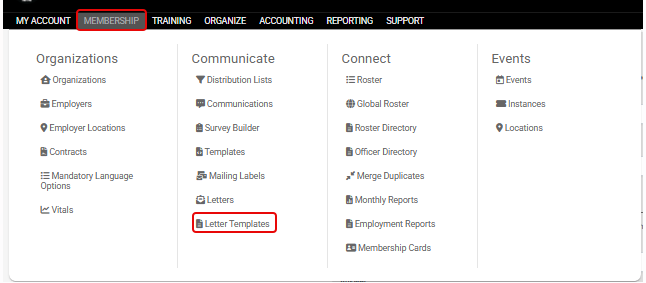
Under Membership > Letter Templates
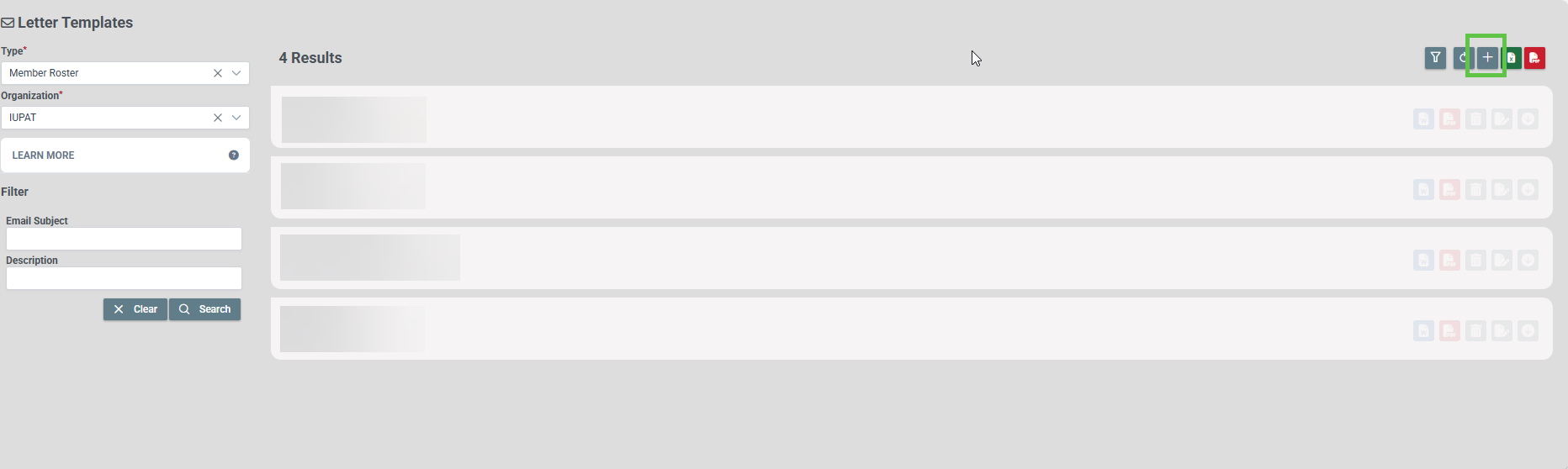
Click the "+" button to start creating/uploading a template
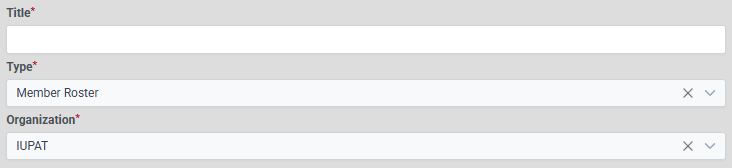
Enter a title and select where/how you wish to save it
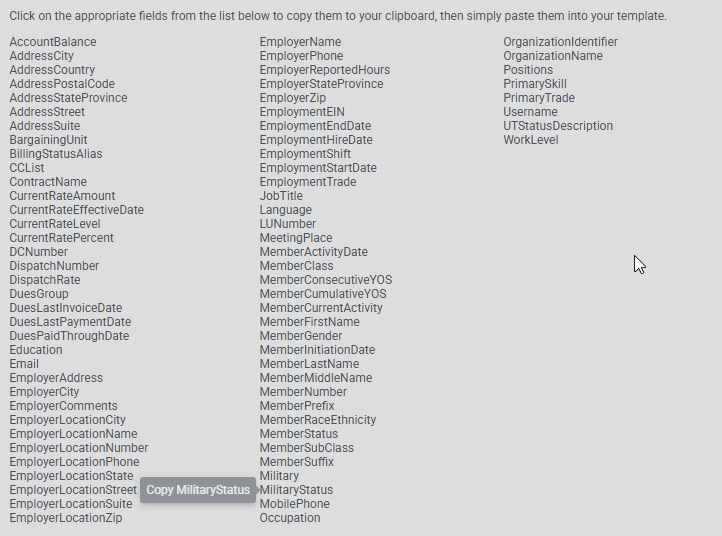
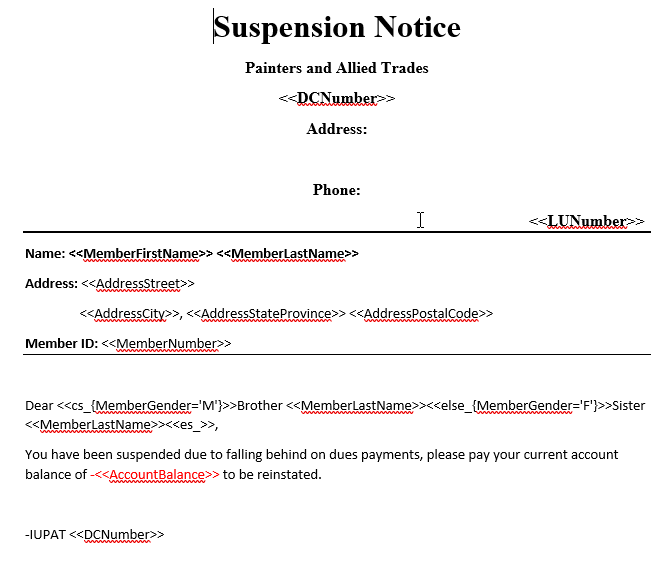
There is a list of values you can click on to copy and put into a document. These values will be auto filled when the letter is created for a member. EX: If you copy the local union value and create a letter, the local union on the letter will be equal to the member's local.
The templates saved in this article can show how these different values can be used.
To Upload a Letter Template
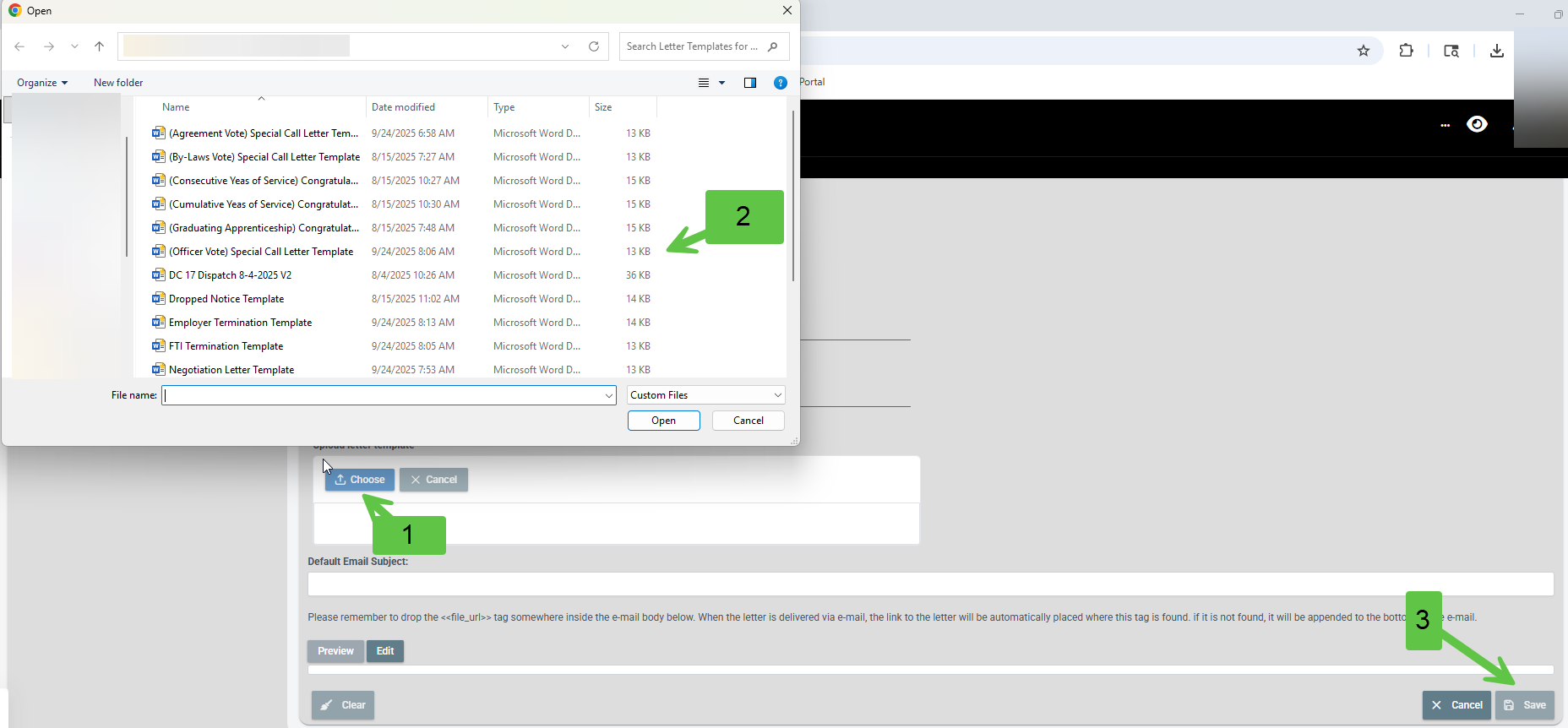
To upload a template, click the choose button and select the template you wish to upload. Then hit save.
Using a letter template on a member account
Click the letter button on the member card

1. Enter the name of the letter. This will be the name of the document that gets saved in the Doc Tab of the member's account.
2. Select if you wish to CC people. This can be used to notify officers or staff a letter was sent to the member. The CCed person will also receive the letter.
3. Select which template you wish to use.
4. Select to print or email the letter.
Then hit save to process the letter

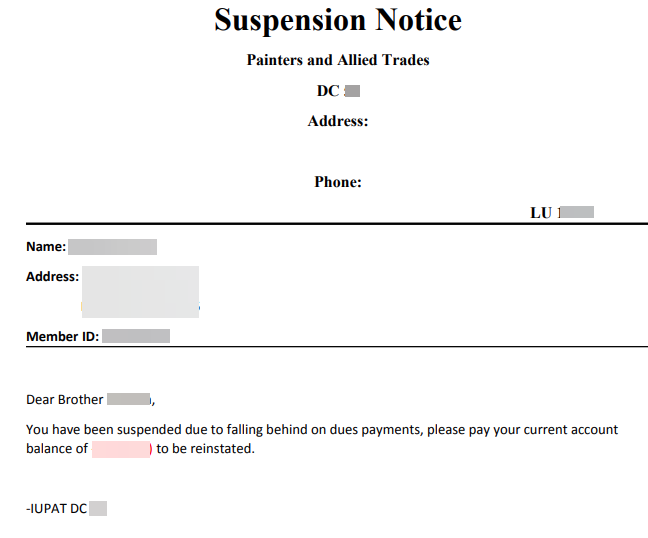
How the letter turns out vs how the letter looks as a template
Finished
Template
Automations/Functions of Letter Templates
Today's Date:
If you wish for the date value to be the current day the letter is created, Word has a built-in feature that allows this. Under the Insert tab, in the Text section, there is a Date & Time option. This gives you the option to format the date value and set it up to automatically update each time the file is opened or created (See picture below).
EX: This can serve as a timestamp for when the letter is created.
Date Calculation:
You can also perform date calculations within the letter templates, the layout must be very precise. If you want a date in the past or future that auto-updates upon the letter's creation, this would be how it is done. For this the date & time insert won't work for this; instead, you must use a function to calculate the value. Listed below are a few ways these functions can be written and what purpose they serve. The picture below also shows one of these functions typed out, in that example, it calculates the current date minus 2 months, then reformats it.
EX: Current date reformatted <<{dateFormat($nowUTC,'MMMM YY')}>> , this would take the current date and format it to be July 26.
How it works: $nowUTC is the current Coordinated Universal Time, which includes the date and time. Then the dateformat function takes that current date & time and formats it using the MMMM YY format.
Date Formattings - Let's look at this as if it is July 2026,
m = 7
mm = 07
mmm = Jul
mmmm = July
yy = 26
yyyy = 2026
In our example above, the outcome would be July 26.
EX: Current date plus/minus 2 months <<{dateAdd( $nowUTC,2,'months' )}>> , this would take the current date and add 2 months to it.
How it works: $nowUTC is the current Coordinated Universal Time, which includes the date and time. Then the dateadd function can add days, months or years to the current value. In this example it is adding 2 months
Adding versus subtracting values is determined by the sign infront of the number in the function, so in this example, the value is 2. This is adding 2 months, we can change that to -2, and it would remove 2 months.
The dateadd function can be used to represent a date in the future or past. If you wished to send a letter out to a member who is going to be dropped in 3 months, you could calculate the date instead of telling them they have 3 months from the current date. You can use the formula above, replacing the 2 with a 3, and it will display that three-month deadline. The issue would then be the ending value, let's say you created that on today's date, then the outcome would be October 27, 2026. That is not the end of the month, so the deadline is not entirely accurate. That is where you can bring in the dateformat function and change the formatting to mmmm yy, so the ending result will be October 2026. This would be a better way to provide a deadline (This function can be seen in the picture below).
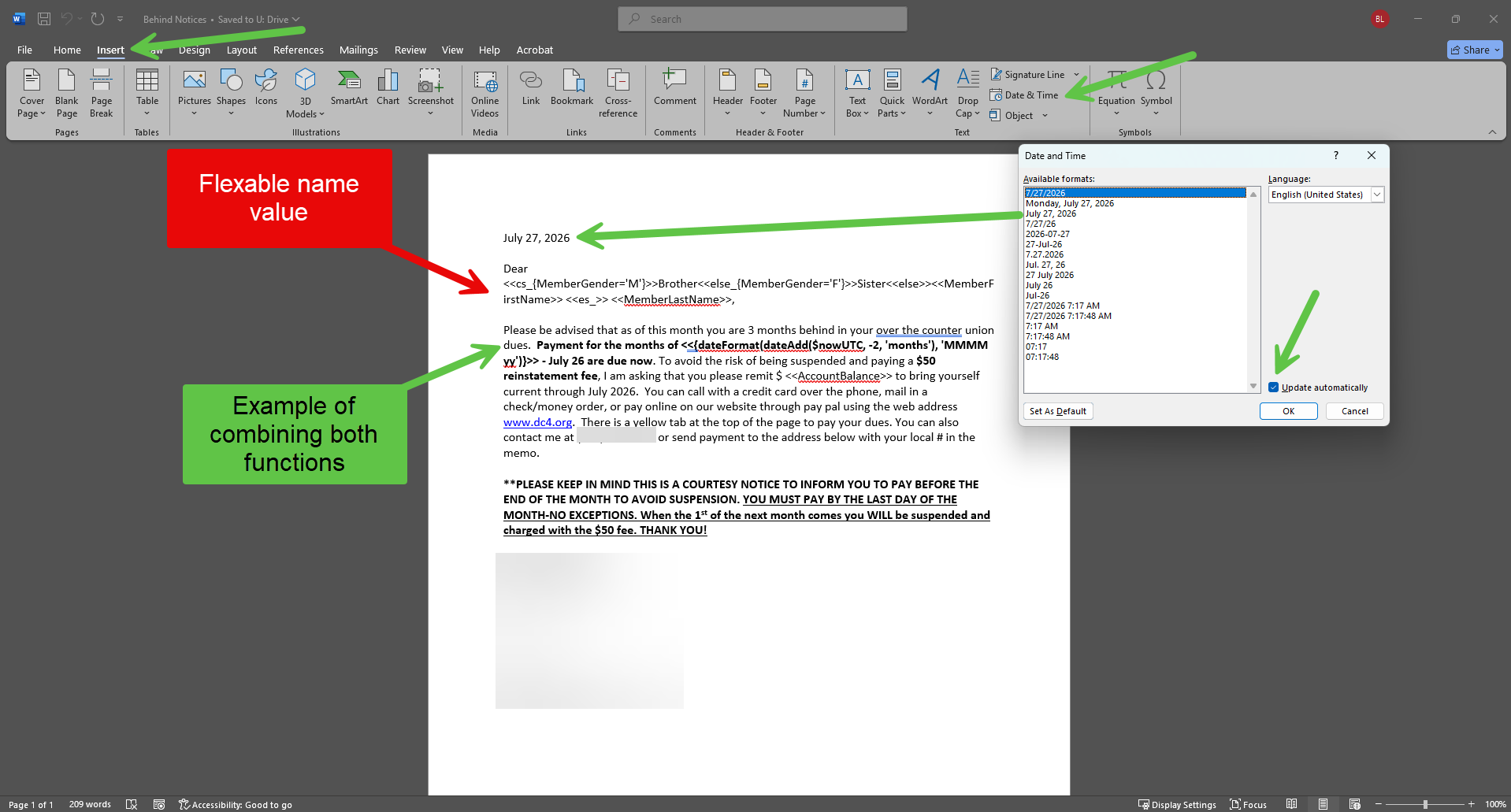
This picture shows the autoupdating date & time function built into Word, as well as the date calculation functions combined into 1 clean outcome.
Conclusion
These letter templates below are to help show what is capable within UNITE and can be used to help streamline a lot of the work that is associated with sending mail to the members.
Examples
Dates: (The formatting results are all based on if the current date is January 1st)
If a member is suspended and you wished to marked the month they will be dropped, this is how you would do it:
<<{dateFormat(dateAdd($nowUTC, 3 'months'), 'MMMM yy')}>>
This function will take the current date and add 3 months to it and show the month the member will be dropped in.
Date add/subtract and formatting
<<{dateFormat(dateAdd($nowUTC, -1 'months'), 'MMMM yy')}>>
-Current Date minus 1 month, then formatted as January(MMMM) 26(yy)
<<{dateFormat(dateAdd($nowUTC, 1 'months'), 'MMMM yy')}>>
-Current Date plus 1 month, then formatted as January(MMMM) 26(yy)
<<{dateFormat(dateAdd($nowUTC, -2 'months'), 'MMMM yy')}>>
-Current Date minus 2 month, then formatted as January(MMMM) 26(yy)
<<{dateFormat(dateAdd($nowUTC, 2 'months'), 'MMMM yy')}>>
-Current Date plus 2 month, then formatted as January(MMMM) 26(yy)
<<{dateFormat(dateAdd($nowUTC, -3 'months'), 'MMMM yy')}>>
-Current Date minus 3 month, then formatted as January(MMMM) 26(yy)
<<{dateFormat(dateAdd($nowUTC, 3 'months'), 'MMMM yy')}>>
-Current Date plus 3 month, then formatted as January(MMMM) 26(yy)
Date add/subtract
<<{dateAdd($nowUTC, 20 'days')}>>
-Current Date plus 20 days
<<{dateAdd($nowUTC, -15 'days')}>>
-Current Date minus 15 days
<<{dateAdd($nowUTC, 5 'months')}>>
-Current Date plus 5 months
<<{dateAdd($nowUTC, -2 'months')}>>
-Current Date minus 2 months
<<{dateAdd($nowUTC, 2 'years')}>>
-Current Date plus 2 years
<<{dateAdd($nowUTC, -1 'years')}>>
-Current Date minus 1 year
Date formatting
<<{dateFormat($nowUTC, 'MM yy')}>>
-Current date turned into 01 26
<<{dateFormat($nowUTC, 'MM yyyy')}>>
-Current date turned into 01 2026
<<{dateFormat($nowUTC, 'MMM yy')}>>
-Current date turned into Jan 26
<<{dateFormat($nowUTC, 'MMM yyyy')}>>
-Current date turned into Jan 2026
<<{dateFormat($nowUTC, 'MMMM yy')}>>
-Current date turned into January 26
<<{dateFormat($nowUTC, 'MMMM yyyy')}>>
-Current date turned into January 2026
Formalities
<<cs_{MemberGender='M'}>>Brother<<else_{MemberGender='F'}>>Sister<<else>><<MemberFirstName>> <<es_>> <<MemberLastName>>
This will give back "Brother", "Sister", or nothing based on the gender value on the roster. The result would be "Brother (Last Name)", "Sister (Last Name)", or (Last Name).
This can be combined with a Dear,... at the beginning of the letter to help add a level of personability to the template.
Was this article helpful?
That’s Great!
Thank you for your feedback
Sorry! We couldn't be helpful
Thank you for your feedback
Feedback sent
We appreciate your effort and will try to fix the article