Securing your family’s peace of mind takes less than 5 minutes. Follow these simple steps on your smartphone to access your Member Mobile Portal (MMP) and fill out your IUPAT Death Benefit Beneficiary Card.
STEP 1: Log In or Create Your MMP Account
First, you need to access the IUPAT Member Mobile Portal (MMP).
If you already have an account: Open the MMP app or website and log in using your registered email address and password.
If you do not have an account yet: Check out this article
Password Reminder: Your password must be at least 10 characters long and include an uppercase letter, a lowercase letter, a number, and a special character (use only:
! % * ? @ $ &).
STEP 2: Navigate to Your Profile
Once you are logged into the dashboard, go into your official member record:
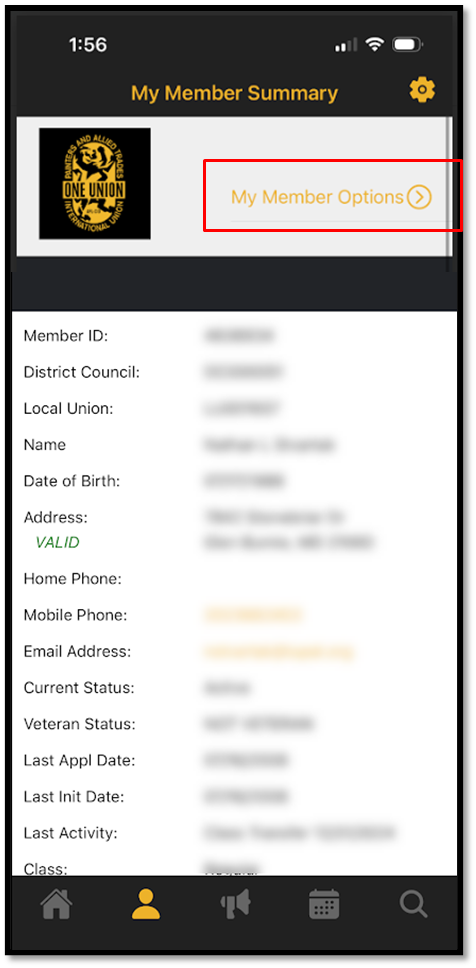
Tap the Profile button (typically located at the bottom of your mobile screen).
Look near the top of your screen and tap My Member Options.
STEP 3: Open the Beneficiary Card
Now, access your digital documents portal:
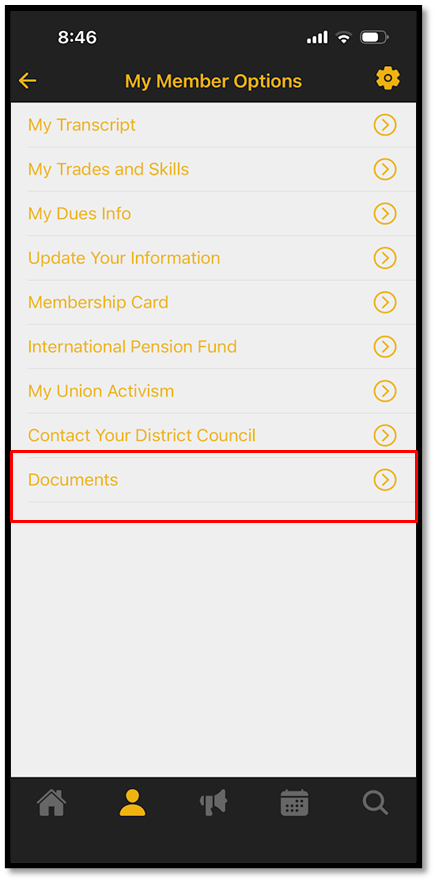
From the menu options, select Documents.
Tap on IUPAT Death Benefit Beneficiary Card.
This will securely launch your digital beneficiary form.
STEP 4: Fill Out and Submit the Form
The form will open directly on your device. Complete the required fields accurately:
- Designate Your Beneficiaries:
- Enter the name, relationship, and contact information for the person (or people) you are choosing to receive your death benefit.
- Enter the name, relationship, and contact information for the person (or people) you are choosing to receive your death benefit.
Sign and Submit: Sign the digital form using your touchscreen and tap the Submit button at the bottom.
Was this article helpful?
That’s Great!
Thank you for your feedback
Sorry! We couldn't be helpful
Thank you for your feedback
Feedback sent
We appreciate your effort and will try to fix the article